
(For LandinChat– WhatsApp Business API)
To use the WhatsApp Business API with LandinChat, you must understand how Meta Business Manager, WhatsApp Business Accounts (WABA), and Phone Numbers are structured and connected.
These three components work together and cannot be configured randomly. Misunderstanding this structure is one of the biggest causes of setup failures and account limits.
This guide explains each part clearly and how they fit together.
WhatsApp Business API Structure (High-Level) #
When setting up WhatsApp Business API, the hierarchy looks like this:
- Meta Business Manager
→ owns and controls everything - WhatsApp Business Account (WABA)
→ lives inside Business Manager
→ manages templates and phone numbers - Phone Numbers
→ connected to a WABA
→ used to send and receive WhatsApp messages - Each layer has strict rules.
Meta Business Manager (Top Level) #
Meta Business Manager is the central control panel for all your business assets.
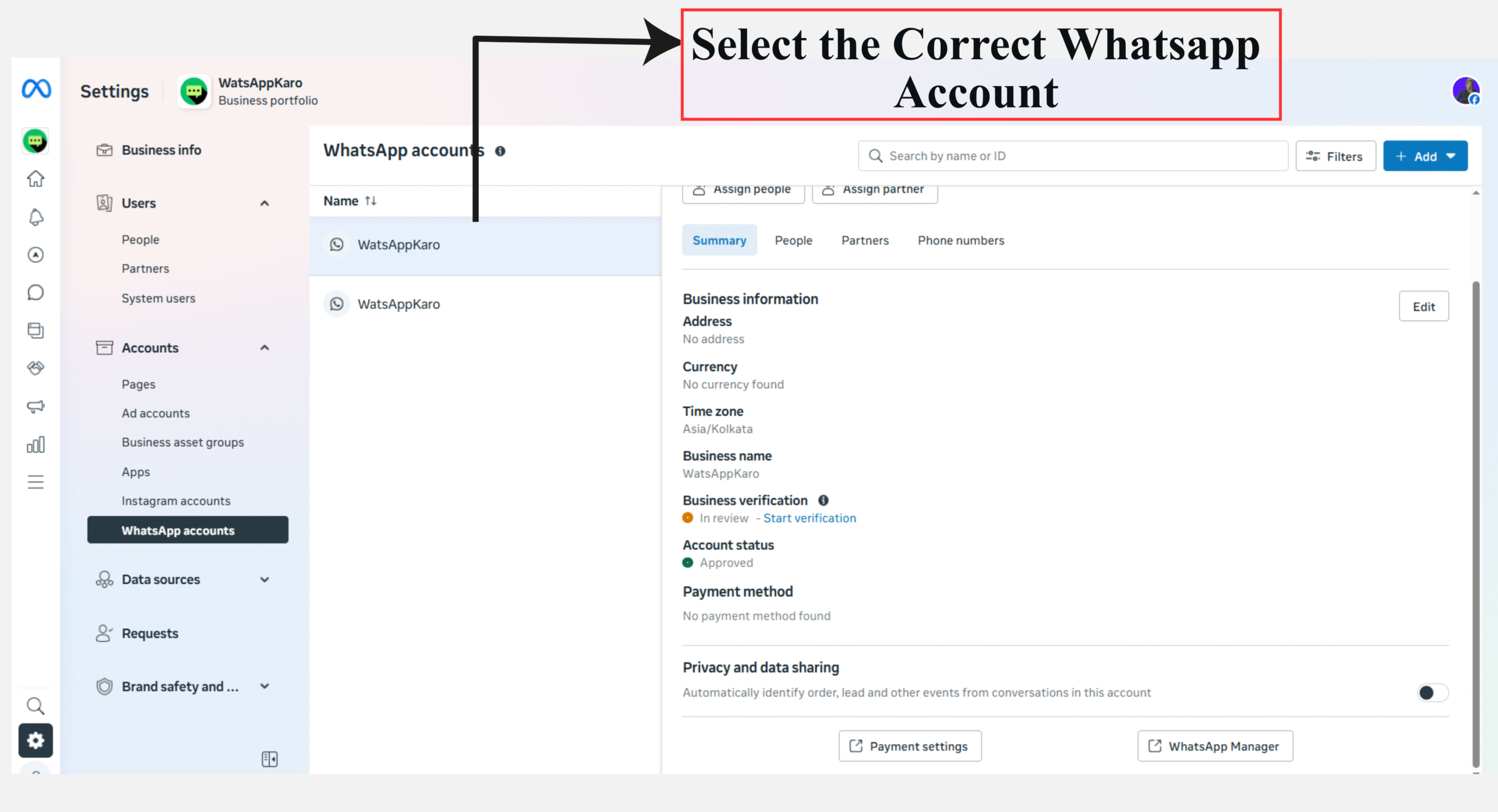
It manages:
- WhatsApp Business Accounts (WABA)
- Phone numbers
- User roles and permissions
- Business verification
Key Points #
- Business verification is mandatory to fully scale WhatsApp API usage
- All WhatsApp-related assets are controlled here
- Only Admins can perform critical actions (billing, verification, number setup)
- One Business Manager can manage multiple WABAs
If Business Manager is misconfigured, nothing else works properly.
WhatsApp Business Account (WABA) #
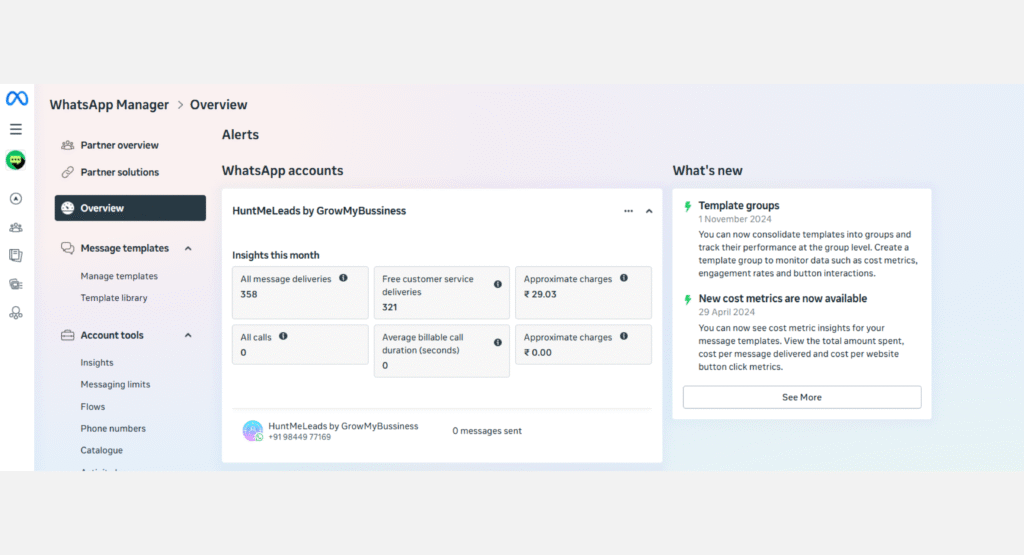
A WhatsApp Business Account (WABA) connects your business to WhatsApp’s Cloud API.
This is where:
- Message templates are created and approved
- Phone numbers are attached
- Messaging limits are applied
Types of WhatsApp Business Accounts #
1️⃣ Business Account (Default) #
- Automatically created during API setup
- Users usually see your phone number, not business name
- Business profile details are still visible
- Suitable for most businesses
2️⃣ Official Business Account (OBA / Green Tick) #
- Reserved for well-known and notable brands
- Shows business name in all WhatsApp views
- Displays green verification badge
- Requires separate approval after business verification
Most businesses do not need OBA status to operate successfully.
WABA Limits & Capabilities #
- Unverified businesses → 1 phone number only
- Verified businesses → up to 25 phone numbers
- Can store up to 250 message templates
- One WABA can serve multiple teams or departments
A WABA can belong to only one Business Manager.
Phone Numbers (Execution Layer) #
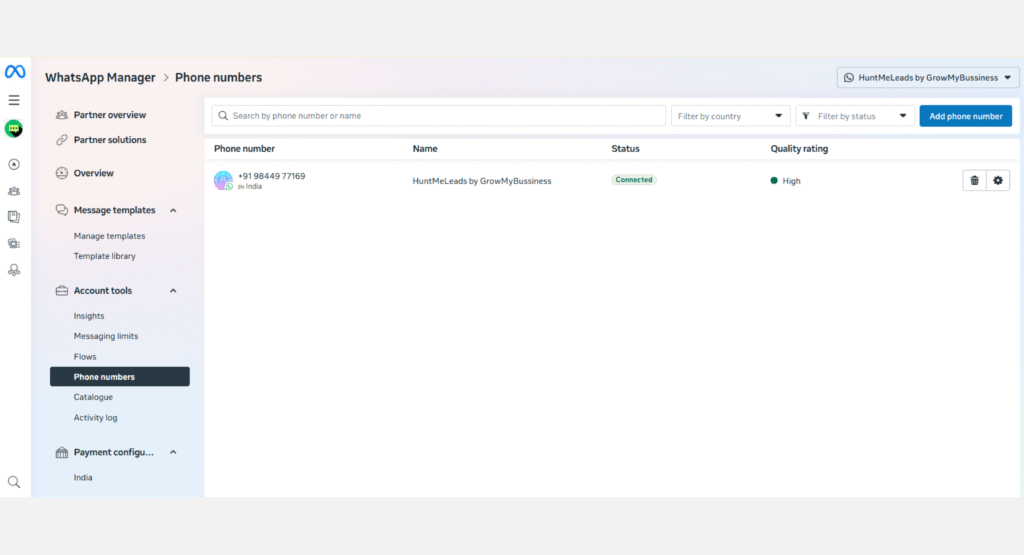
Phone numbers are the actual identities customers interact with on WhatsApp.
Each phone number:
- Is linked to one WABA
- Is verified via OTP
- Handles messaging, automation, and conversations
Key Rules for Phone Numbers #
A phone number can be used on only one platform:
- WhatsApp Business API OR
- WhatsApp Business App / WhatsApp Messenger
Once connected to API, it cannot be used on the app
Phone numbers must be verified before messaging starts
Managing Multiple Phone Numbers #
For verified businesses:
- Up to 25 phone numbers per WABA
- Useful for:
- Different departments
- Locations
- Products or brands
Business Account vs Official Business Account (Quick Comparison) #
| Feature | Business Account | Official Business Account |
|---|---|---|
| Default account | ✅ Yes | ❌ No |
| Business name visible everywhere | ❌ No | ✅ Yes |
| Green tick badge | ❌ No | ✅ Yes |
| Requires notability | ❌ No | ✅ Yes |
| Required for WhatsApp API | ✅ Yes | ❌ No |
Green tick is optional, not required.
Increasing Phone Number Limits #
By default:
- Verified WABA → up to 25 phone numbers
If you need more:
- You can request an increase through Meta Support
- Approval depends on usage, reputation, and business need
Critical Limitations You Must Know #
- ❌ Unverified businesses are limited to one phone number
- ❌ One phone number cannot be used on App and API together
- ❌ A WABA cannot be shared across multiple Business Managers
- ❌ You cannot migrate a WABA from one business to another
- ❌ Phone numbers cannot be freely moved between WABAs
Ignoring these rules leads to blocked setups.
Why This Structure Matters for LandinChat #
LandinChat connects directly to:
- Your Meta Business Manager
- Your WABA
- Your phone numbers
Understanding this structure ensures:
- Faster onboarding
- Fewer approval rejections
- Smooth scaling of WhatsApp campaigns
Summary #
- Business Manager → owns and controls everything
- WABA → manages messaging and templates
- Phone Numbers → send and receive WhatsApp messages
Verifying your Business Manager unlocks scale, flexibility, and stability.
Frequently Asked Questions (FAQs) #
1. Do I need Meta Business Manager to use LandinChat? #
Yes.
WhatsApp Business API cannot be used without Meta Business Manager.
2. What is a WABA in simple terms? #
A WABA is your WhatsApp API container that holds phone numbers and message templates.
3. Can I have multiple WABAs? #
Yes.
One Business Manager can own multiple WABAs.
4. How many phone numbers can I use? #
- Unverified business → 1 number
- Verified business → up to 25 numbers per WABA
5. Can I use the same phone number on WhatsApp App and API? #
No.
A number can be used on only one platform at a time.
6. Is green tick (Official Business Account) mandatory? #
No.
Most businesses operate perfectly without it.
7. Can I move a WABA to another Business Manager? #
No.
WABAs cannot be migrated between Business Managers.
8. Can I use one WABA for multiple departments? #
Yes.
Different phone numbers can represent different teams or services.
9. What happens if my business is not verified? #
You’ll face:
- Phone number limits
- Lower messaging limits
- Higher risk of restrictions
10. Why does LandinChat need access to my Business Manager? #
To connect securely to:
- Your WABA
- Your phone numbers
- WhatsApp Cloud API
using your own Meta credentials, not ours.