
(For LandinChat – WhatsApp Business API)
Your WhatsApp Quality Rating is a health score assigned by Meta to each WhatsApp Business API phone number.
It reflects how users react to your messages and directly impacts your ability to scale messaging.
Quality Rating is not cosmetic. It controls:
- Messaging limit upgrades
- Risk of restrictions
- Long-term deliverability
Ignore it, and your account will stall or regress.
WhatsApp Quality Rating Levels #
Meta assigns one of three ratings:
🟢 High (Green) #
- Users engage positively
- Low block/report rate
- Ideal state for scaling
🟡 Medium (Yellow) #
- Acceptable performance
- Some negative signals
- Scaling possible but slower
🔴 Low (Red) #
- High blocks or reports
- Poor engagement
- High risk of limit reduction or restriction
Once you hit Red, recovery takes time.

Why Quality Rating Matters #
Your quality rating directly affects:
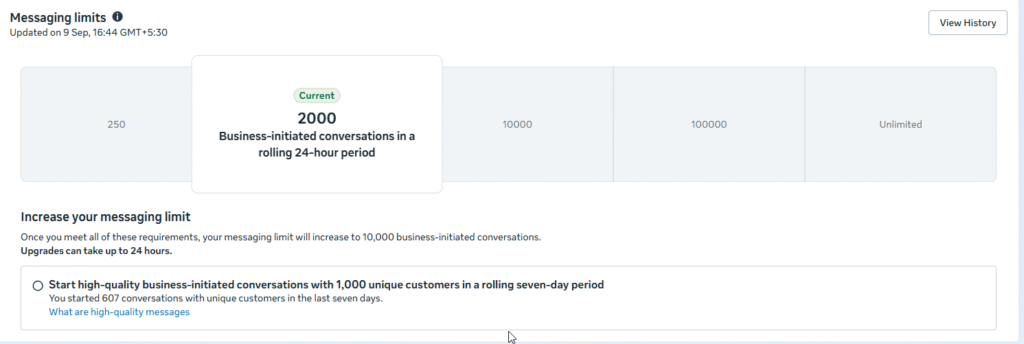
- Messaging limit upgrades (250 → 2K → 10K → 100K → Unlimited)
- Account trust with Meta
- Campaign stability
- Risk of temporary or permanent restrictions
High volume with poor quality = penalties.
Meta prioritizes user experience over business growth.
What Affects Your Quality Rating #
Meta evaluates how users interact with your messages.
User Interaction Signals #
Positive Signals
- Replies
- Button clicks
- Continued conversation
Neutral Signals
- No interaction
- Read without response
Negative Signals
- Users block your number
- Users report messages as spam
Negative signals weigh far more heavily than positive ones.
How to Improve and Maintain a High Quality Rating #
Best Practices (Non-Negotiable) #
- Message only opted-in users
- Follow WhatsApp Business Messaging Policy
- Send relevant, useful content
- Personalize messages where possible
- Control message frequency (don’t spam)
Quality beats volume. Always.
Broadcast Messaging Strategy (Safe Approach) #
- Start with smaller batches
- Monitor quality rating daily
- Pause campaigns if rating drops
- Resume only after recovery
Blasting messages when rating is low makes things worse.
What to Do If Your Quality Rating Drops #
If your rating turns Yellow or Red:
- Stop all non-essential broadcasts
- Review recent campaigns
- Identify why users reacted negatively
- Wait for the rating to recover (usually 5–7 days)
- Resume slowly with improved messaging
Panic-sending more messages is the worst move.
Quality Rating & Messaging Tier Upgrades #
To move up messaging tiers, you must:
- Use at least 50% of your current messaging limit
- Maintain Medium or High-quality rating
- Avoid being flagged for 7 consecutive days
Example: #
- Tier 1 (1,000/day) → Message at least 500 unique users
- Tier 2 (10,000/day) → Message at least 5,000 unique users
Usage + quality together unlock scale.
Key Takeaway #
- Quality Rating is controlled by Meta
- LandinChat does not override or manipulate it
- Good messaging habits = growth
- Bad messaging habits = limits and blocks
There are no hacks here.
Frequently Asked Questions (FAQs) #
1. Can I send messages with a low (Red) quality rating? #
Yes, but it’s strongly discouraged.
Risk of number blocking or restriction increases sharply.
2. How long does it take to improve a quality rating? #
Usually 5–7 days of careful, low-volume messaging or complete pause.
3. What causes the biggest quality drops? #
- Messaging non–opted-in users
- Too frequent broadcasts
- Irrelevant or misleading content
- Aggressive sales messaging
4. Does replying to users improve quality rating? #
Indirectly, yes.
Engaged conversations reduce negative signals.
5. Where can I see my quality rating? #
In WhatsApp Manager → Account tools → Phone numbers.
6. Does a high quality rating guarantee tier upgrades? #
No, but it’s mandatory.
You still need sufficient usage.
7. Does LandinChat affect my quality rating? #
No.
Quality rating depends entirely on how users react to your messages.
8. Should I stop messaging if my rating turns Yellow? #
Reduce volume and improve content.
Don’t continue aggressive campaigns.
9. Can quality rating recover from Red? #
Yes, but slowly.
Recovery requires patience and better messaging practices.
10. What’s the safest long-term strategy? #
- Opt-in only
- Value-driven messages
- Controlled frequency
- Continuous monitoring
That’s how accounts scale safely.