
(Embedded Signup – WhatsApp Business API)
⚠️ Read This First (Do NOT Skip) #
- We strongly recommend using a NEW phone number
- The number must NOT be active on:
- WhatsApp Messenger
- WhatsApp Business App
- If you use an existing number, you must delete it from WhatsApp first
- This process is irreversible without downtime
👉 If you’re unsure, stop here and contact LandinChat support.
Step 1: Log in to LandinChat #
Log in to your LandinChat account
Step 2: Go to “Connect Account” #
From the left menu, click Connect Account
Or use the direct connection link provided in your dashboard
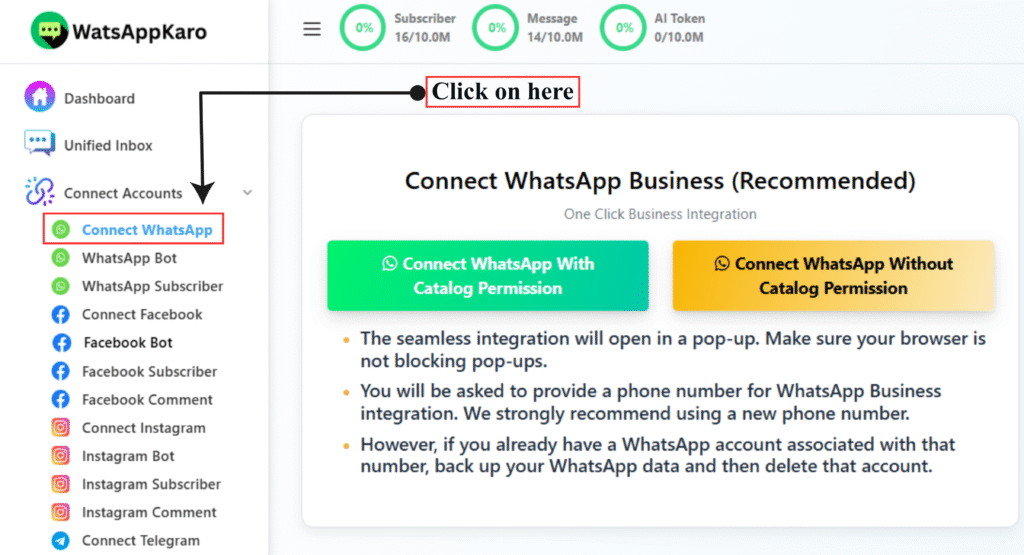
Step 3: Click “Connect WhatsApp” #
Click the Connect WhatsApp button
A popup will open to start WhatsApp’s Embedded Signup
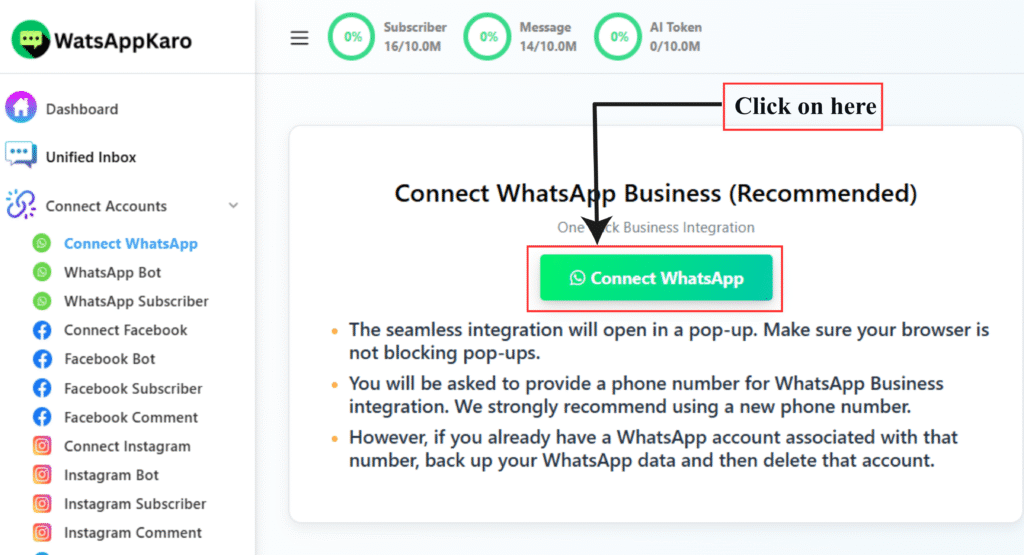
Step 4: Log in with Facebook #
- Log in using the Facebook account linked to your Meta Business Manager
- If already logged in, Facebook will continue automatically
⚠️ You must be an Admin of the Meta Business Manager to proceed.
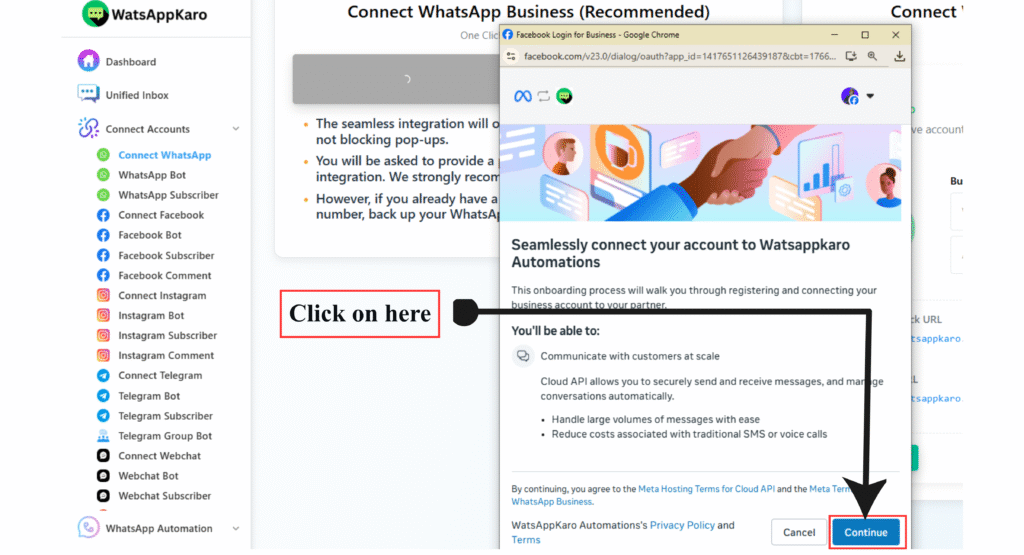
Step 5: Business Selection (Meta Business Manager) #
- If you already have a Business Manager, it will be shown
- If you don’t, Meta may prompt you to create one
- If you are not an admin or have reached the business limit, you cannot continue
Fix this before proceeding.
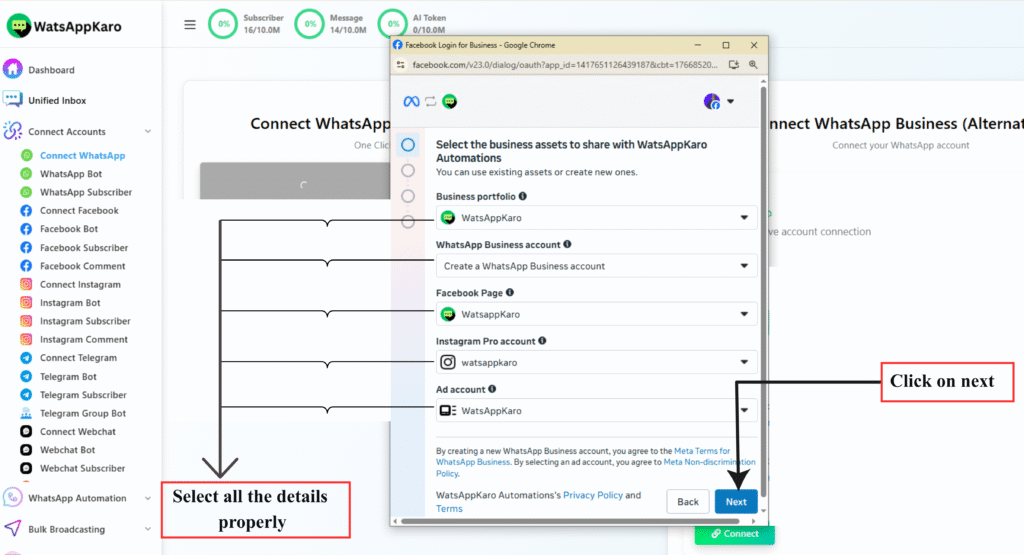
Step 6: Select or Create WhatsApp Business Account (WABA) #
You’ll see three options:
Option 1: Create New WABA + Profile (Recommended) #
Best for new setups
Enter required business details
Website field is optional
Option 2: Use Existing WABA + Create New Profile #
- Use if you already have a WABA but need a new number
Option 3: Use Existing WABA + Profile #
- Details will be shown but not editable
- Changes must be done later in WhatsApp Manager
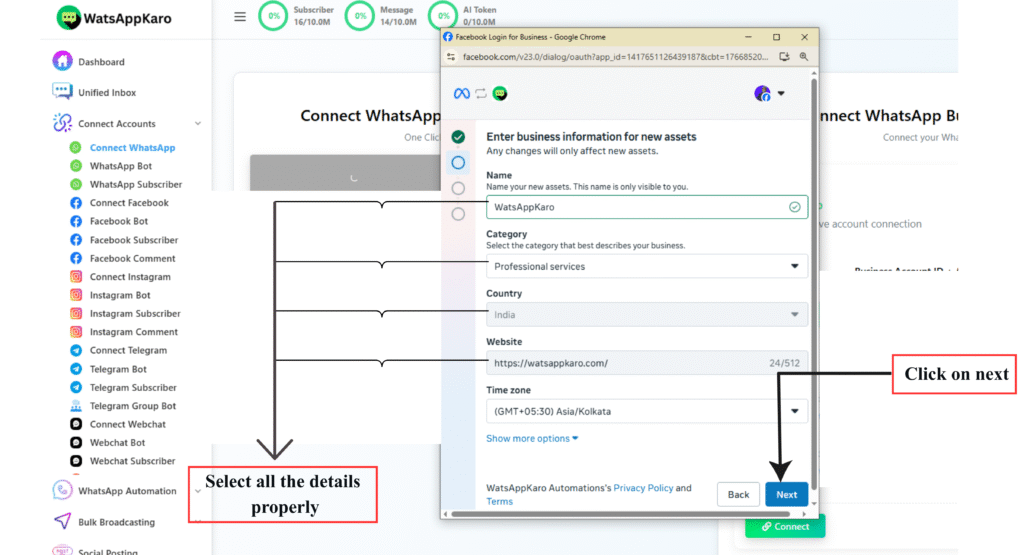
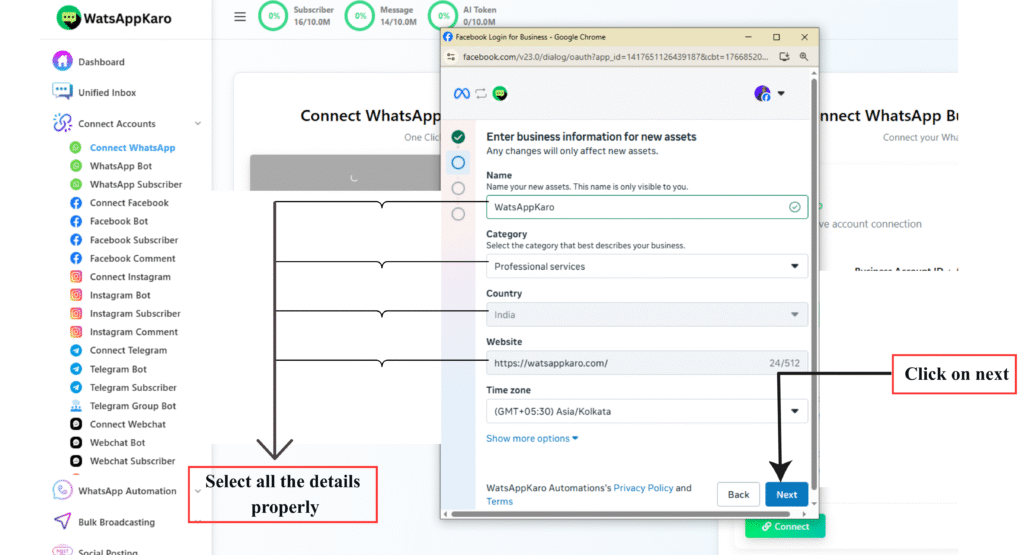
Step 7: Create WhatsApp Business Profile (IMPORTANT) #
Business Account Name #
- Must be your legal company name
- Used internally by Meta
Display Name (Most Common Rejection Reason) #
This is what users see on WhatsApp.
- Must clearly identify your business
- Must include your company name
Rules you MUST follow:
Correct Format: #
“Brand Name by Company Name”
Example:
If company = XYZ Pvt Ltd
Brand = SuperTech
✅ SuperTech by XYZ Pvt Ltd
❌ SuperTech
❌ SuperTech Official
❌ SuperTech Services
Ignoring this causes instant rejection.
Category #
- Select the category that best describes your business
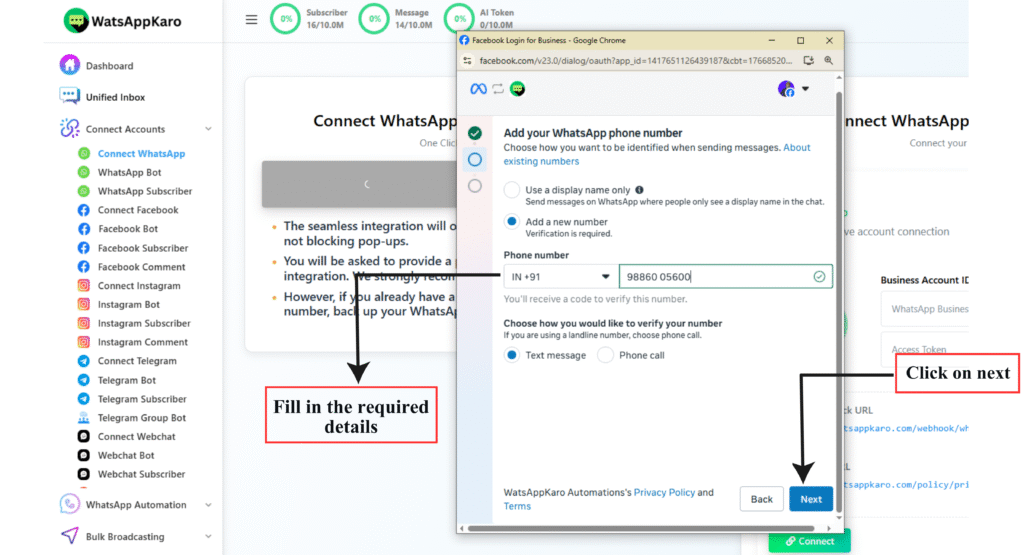
Step 8: Verify Your Phone Number #
- Enter the phone number you want to connect
- Receive OTP via SMS or Call
- Enter the code to verify
The number must be unused on WhatsApp apps.
Step 9: Review Permissions #
WhatsApp will show required permissions
These are mandatory
Click Continue to proceed
After Connection: Mandatory Next Steps #
Your number is connected, but you’re NOT done yet.
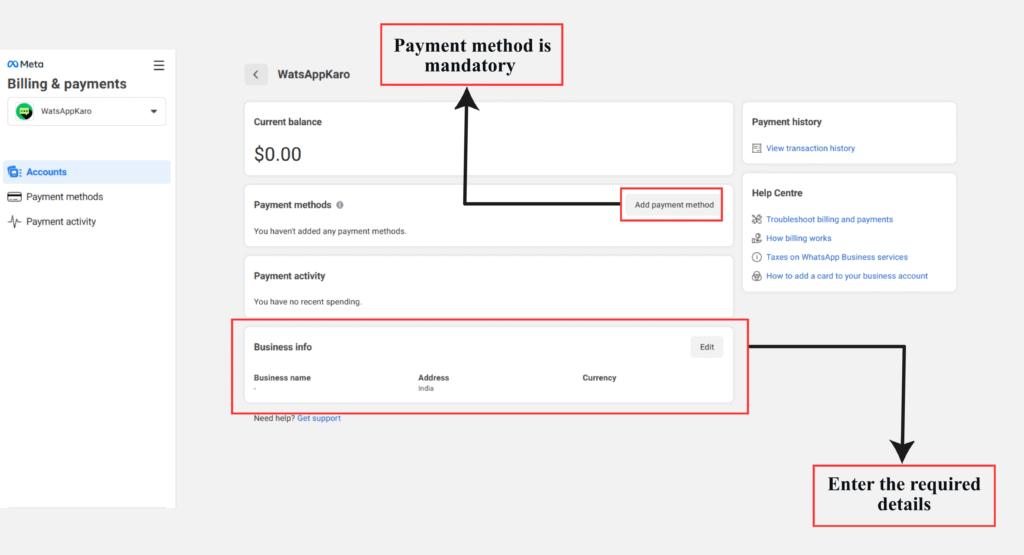
1️⃣ Add Payment Method #
Required for WhatsApp API conversation charges.
👉 See: How to Add Payment Method for WhatsApp API Billing
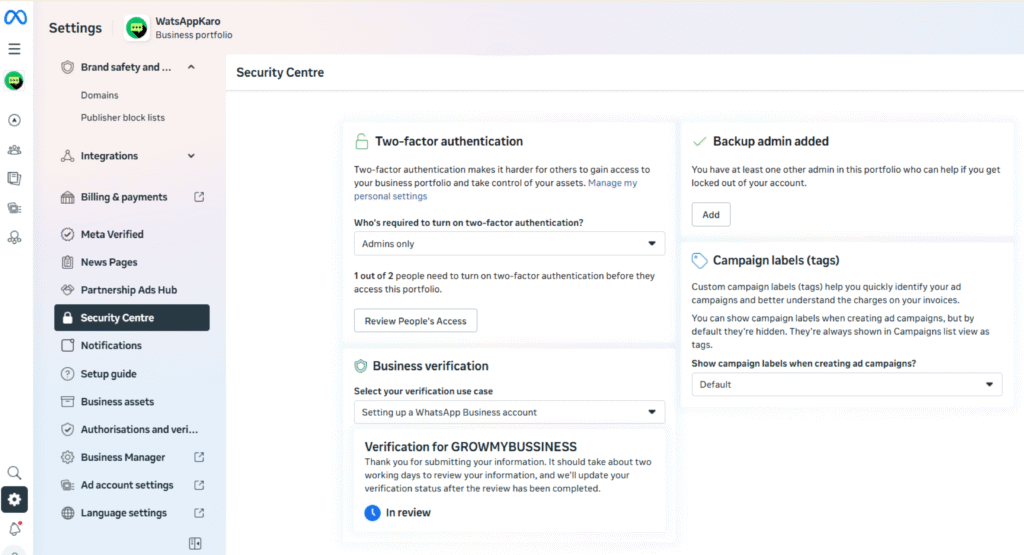
2️⃣ Verify Meta Business Manager #
Required to:
- Increase messaging limits
- Avoid account restrictions
- Build trust with Meta
👉 See: How to Verify Your Meta Business Manager
Without these, your account may be limited or paused.
Final Reality Check (don’t ignore) #
- Most failures happen due to:
- Wrong display name
- Using an active WhatsApp number
- Not being Business Manager admin
- WhatsApp API setup is strict — not forgiving
If anything here feels confusing, ask before clicking Continue.
Need Help ? #
Contact LandinChat Support before proceeding.
Fixing mistakes after setup is harder than doing it right once.
Frequently Asked Questions #
1. Can I use my existing WhatsApp number with LandinChat? #
Yes, but only after deleting it from WhatsApp Messenger or WhatsApp Business App.
WhatsApp does not allow the same number to be used on the app and the API at the same time.
If you don’t want downtime or risk, use a new phone number.
2. Will my chat history be transferred to LandinChat? #
No.
WhatsApp does not support chat migration from the app to the Business API.
Once you delete the WhatsApp account, chat history is permanently lost.
👉 Always back up your chats before proceeding.
3. Can I use the same number on WhatsApp App and API together? #
No. This is not possible.
A phone number can be active on only one of the following:
- WhatsApp Messenger / WhatsApp Business App
- WhatsApp Business API (LandinChat)
Trying to bypass this will fail.
4. Is using a new phone number mandatory? #
Not mandatory, but strongly recommended.
Using a new number:
- Avoids downtime
- Prevents data loss
- Makes approval smoother
Most businesses that face setup issues are using old numbers.
5. Do I need a Meta (Facebook) Business Manager account? #
Yes.
WhatsApp Business API requires a Meta Business Manager.
You must also be an Admin of that Business Manager to complete the setup.
6. What if I’m not an admin of the Business Manager? #
You won’t be able to proceed.
Ask the admin to:
- Add you as an Admin
- Or complete the setup on your behalf
This is a Meta restriction, not a LandinChatlimitation.
7. What is a WABA (WhatsApp Business Account)? #
WABA stands for WhatsApp Business Account.
It’s the container created by Meta that:
- Holds your phone numbers
- Manages templates
- Controls messaging limits
LandinChat connects to your WABA during signup.
8. Why is my WhatsApp display name rejected? #
This is the most common issue.
Your display name must:
- Clearly identify your business
- Include your company name
✅ Correct format:
“Brand Name by Company Name”
❌ Generic names, keywords, or misleading names will be rejected.
9. How long does phone number verification take? #
Usually instant.
In rare cases, it may take a few minutes.
If you recently deleted the number from WhatsApp, wait up to 3 minutes before retrying.
10. Do I need to add a payment method? #
Yes. Mandatory.
WhatsApp charges conversation fees via Meta.
Without a payment method:
- Messages may fail
- Account can be restricted
11. Is business verification compulsory? #
Yes, if you want:
- Higher messaging limits
- Fewer restrictions
- Long-term stability
Unverified businesses often face limits.
12. Can I change business details later? #
Some details can be updated later via WhatsApp Manager, but:
- Display name changes require re-approval
- Some fields are locked after setup
Get it right the first time.
13. Will LandinChat charge me for WhatsApp messages? #
No markup. Ever.
- WhatsApp conversation charges → billed by Meta
- LandinChat charges only its platform subscription
No per-message pricing from us.
14. What should I do if I’m stuck during setup? #
Stop and contact support.
Deleting numbers or submitting wrong details can cause delays that are hard to reverse.
👉 Contact LandinChat Support before retrying.